· clothink
What Is an AI Tech Pack? A Step-by-Step Guide for Fashion Brands
- Tech packs
- Fashion tech
- AI tools
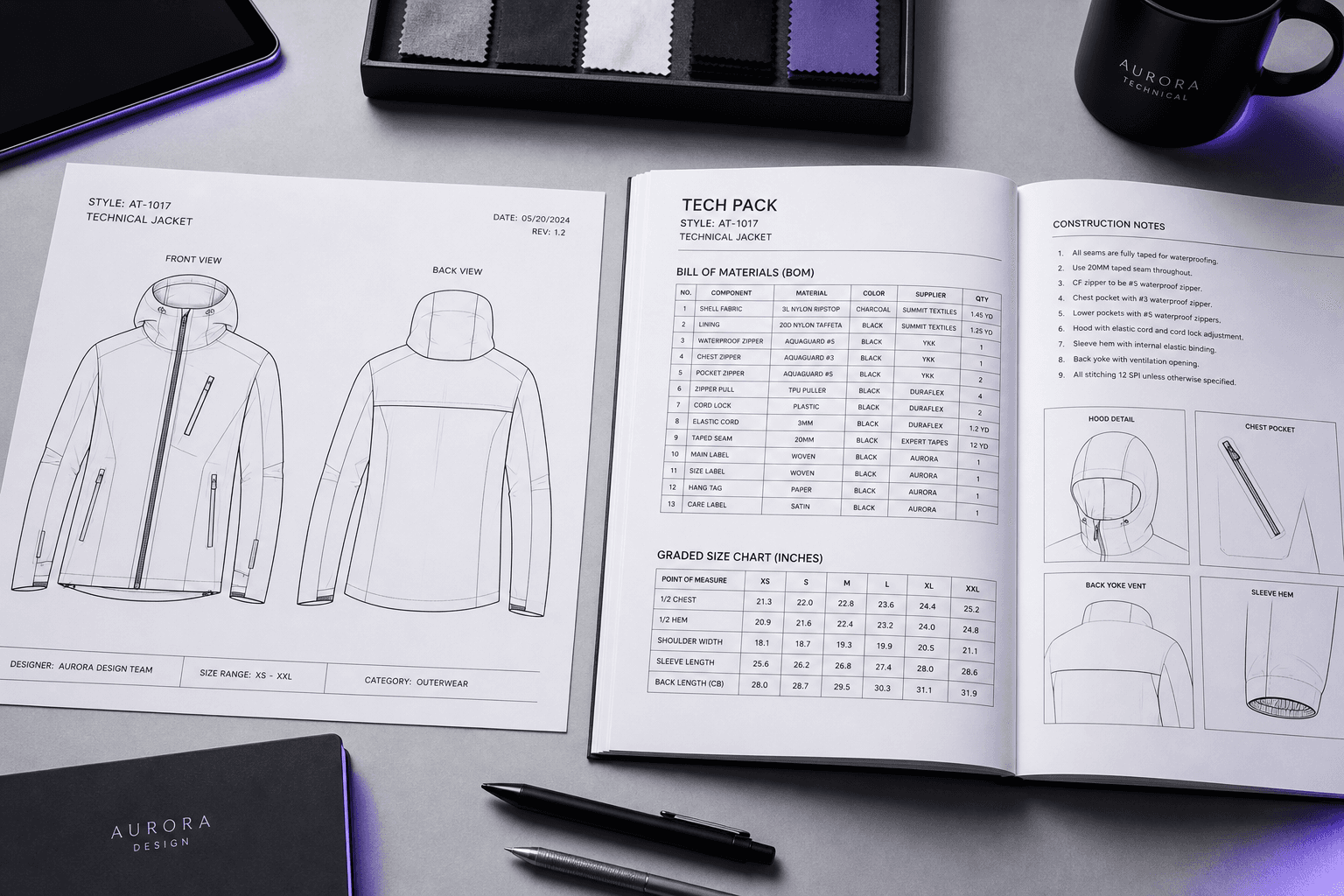
Every factory needs one before they'll quote, cut, or sample your design. Most fashion founders know the term — but fewer know exactly what goes inside a tech pack, or how AI has changed the time and effort involved.
This guide walks through what a tech pack contains, how each section is used on the factory floor, and how clothink's AI features handle the assembly work so you can focus on the design decisions that actually matter.
If you already know what a tech pack is and want to compare software options, see our guide to the best tech pack software for fashion brands. If you are launching your first collection, this guide for startup clothing brands covers the full journey from concept to factory-ready brief.
What goes inside a tech pack
A tech pack is the complete production document for a single garment. It tells a manufacturer every decision you have made — materials, measurements, construction, branding — so they can build it without guessing. The six core sections are:
- Technical flat / construction drawing — front, back, and any detail views. This is the visual anchor for the whole document.
- Bill of Materials (BOM) — every material in the garment listed with type, weight, colour code, supplier reference, and placement. Main fabric, lining, trims, thread, zippers, buttons, labels, packaging.
- Measurements and size chart — all points of measure across every size. The grading rules that define how each size grows from the base.
- Construction notes — stitch type per seam, seam allowance, seam finish, hem method, placket and collar construction, any bonded or welded joins.
- Branding placement — label position and content, care instruction format, hang tag and barcode spec, embroidery or print placement with dimensions.
- Packaging and labelling — folding method, polybag spec, carton dimensions and labelling format for shipping.
A factory uses the technical flat to understand the garment structure. They use the BOM to source materials. They use the size chart to cut and grade. They use the construction notes to sew. Every section feeds the next stage of production — which is why a weak or incomplete tech pack creates expensive problems downstream.
Traditional tech packs vs AI tech packs
The difference between a traditional tech pack and an AI-assisted one is not what the document contains — a factory expects the same sections regardless. The difference is how long it takes to build it and how much of it is manual data entry versus intentional design decisions.
In a traditional workflow, a designer opens a spreadsheet template or a standalone tool, types the BOM row by row, builds the size chart from scratch based on their own grading knowledge, and writes construction notes by hand. For a mid-complexity garment, this takes several hours per style. On a twelve-style collection, that is a week of work before a single factory conversation.
With clothink, the AI handles the assembly. You make the decisions — product type, fit, fabric direction, construction intent — and clothink suggests the data to match. Auto-Complete fills the BOM from your product type and any fabric information already on the style. The size chart generator produces a graded chart from your demographic and fit type in seconds. AI construction notes draft each section from the BOM and size chart you have already built, so the suggestions are specific to your garment, not generic templates.
The result is a first-pass tech pack in a matter of minutes. Not a finished document — you review, edit, and refine — but a complete first draft with real data rather than empty fields.
clothink's AI features — how they work together
The AI in clothink is not a single button. It is a chain of tools that build on each other across the workflow — from the first concept sketch to the final PDF export. Here is how each feature fits:
Stage 1: Generate concepts and technical flats
Before a tech pack exists, a product needs a direction. clothink's Inspire tools let you generate that direction without a blank page. Describe a product brief — garment type, aesthetic keywords, target customer — and the AI returns multiple concept visuals either in coloured CAD format or a black and white technical line drawing as creative starting points.
Colour Palettes: AI-generated colour schemes
Colour decisions belong in the BOM — fabric colour codes, thread codes, trim references. clothink's Colour Palette generator builds harmonious schemes with configurable harmony type, saturation, lightness, season, and mood. Outputs include hex values, colour names, and optional Pantone references. You can import a palette directly into concept generation to keep the visual direction consistent, then carry those colour codes into the BOM.
Colour palette demo
Palette Generator
Build a season colour palette
Describe the collection mood — clothink returns named swatches with hex codes.
Brands: organise styles and white-label PDFs
For brands running multiple clients or labels, clothink Brands organise styles and tech packs under one profile, and supply logo and colours for white-label PDF exports. Set the brand logo and document colours once; linked tech packs can export with that branding when white-label PDFs are enabled.
Stage 2: AI Mockup Generation — CAD to photoreal image
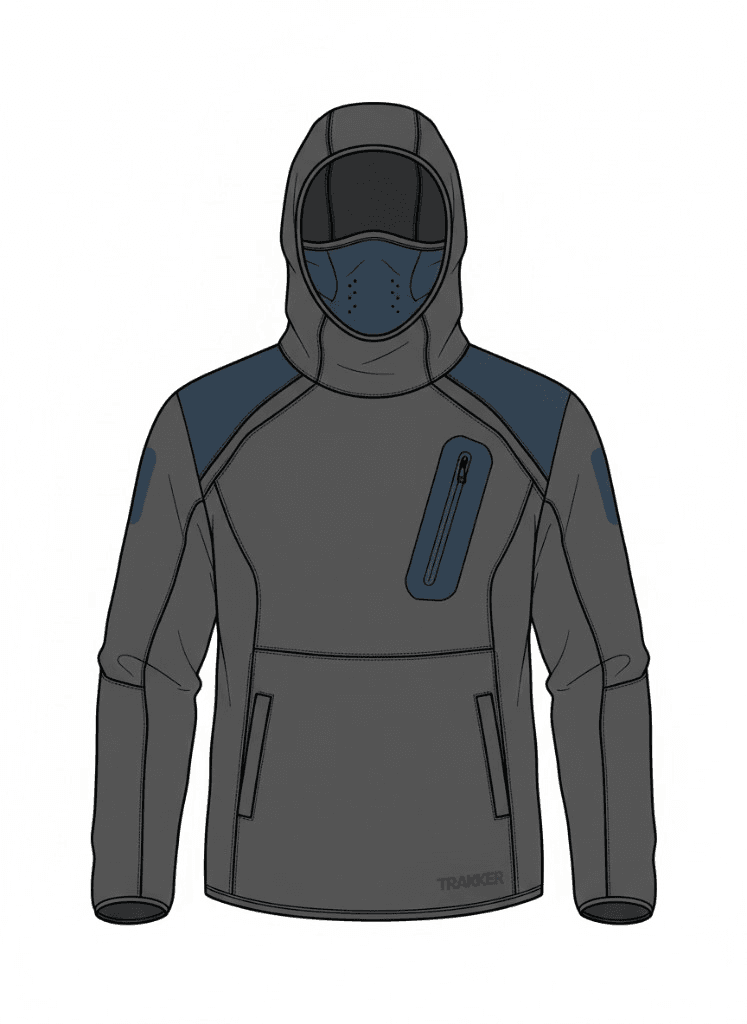
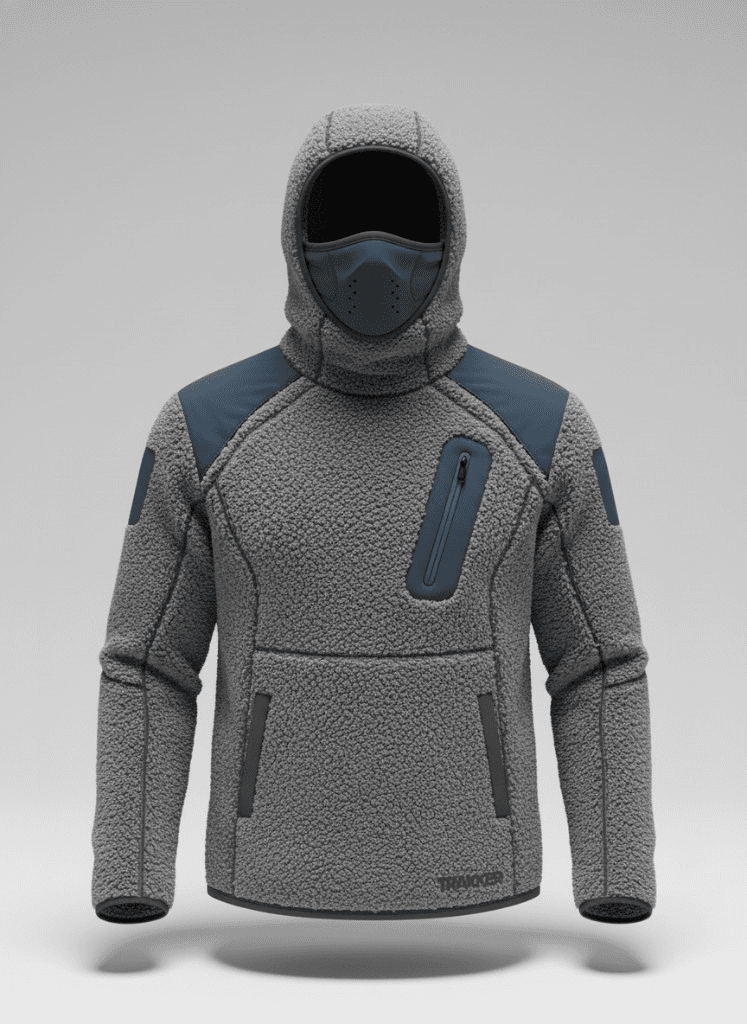
Once you have a technical flat or CAD, clothink's mockup generator turns it into a photoreal product image. No 3D modelling skills. No CLO3D. No render farm. Upload the flat, choose a shot type (model or ghost mannequin), select a background, pick a camera angle, and generate.
The AI generates in HD; Master and Expert plans include 4K HD Upscale for print-quality assets. For social and lookbook use, a 6-second video version of any mockup is available — the same garment, animated for movement.
Mockups are attached to the style record and carry through to the tech pack PDF, so suppliers receive the spec and the approved visual in one document. This closes the gap between design idea and real world product to help suppliers better understand the garment.
Step-by-step: build a factory-ready tech pack with AI
Here is how the tech pack workflow runs in clothink, with each AI feature in context. Each step builds on the one before — which is what makes the suggestions progressively more accurate rather than generic.
Here is a quick checklist of the 7 steps to build a complete, factory-ready tech pack with clothink:
- Create a style record to anchor your design data.
- Generate and attach technical flats, CADs and photoreal mockups
- Fill the tech pack with AI — generate each section individually, or use Auto-Complete to fill the whole document at once.
- Generate a fully graded size chart in seconds.
- Run AI fabric and colour analysis on your mockup.
- Draft detailed construction notes with AI assistance.
- Export formatted PDF tech pack
Step 1 — Create a style record
A style is the anchor for everything else — mockups, tech packs, concepts. Create a style, give it a name, assign a product type, season, fit, and target demographic. This information feeds the AI suggestions throughout the rest of the workflow. A garment defined as a "women's slim-fit outerwear coat" will receive different BOM suggestions and size chart grading from a "men's oversized streetwear hoodie".
Step 2 — Attach flats and mockups, or generate one
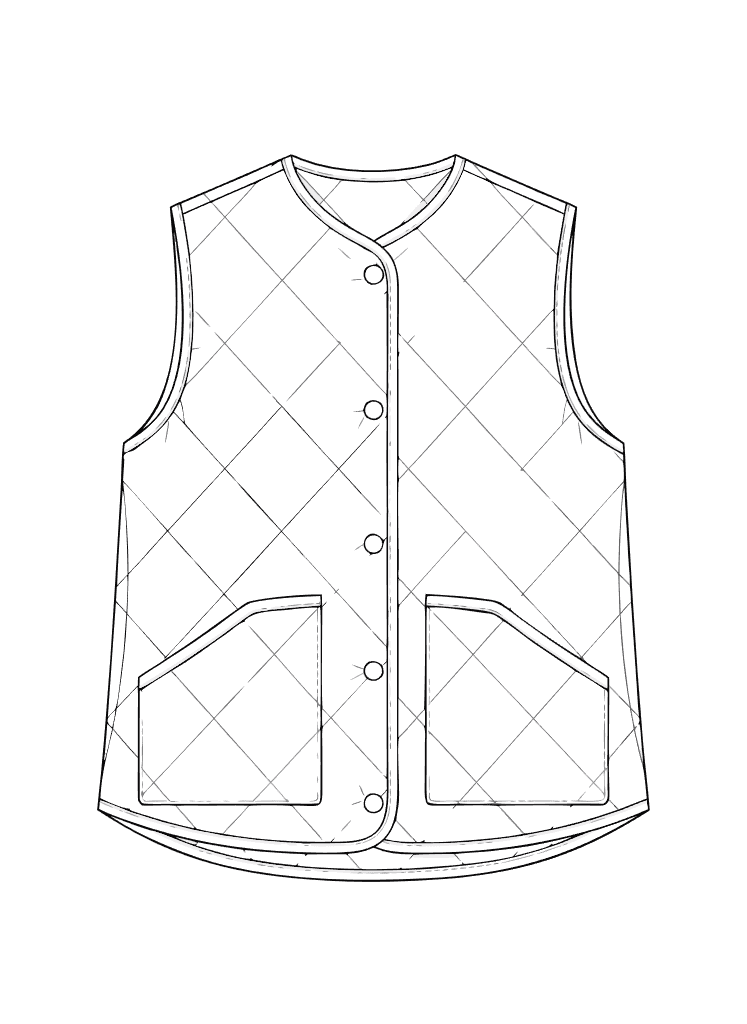
Upload your CAD or technical flat directly. If you do not have one, use the platforms AI generator (describe the garment or upload a reference image) to produce a clean line drawing. The flat becomes an essential part of the tech pack PDF and gives the factory the visual context they need before reading the spec. You can also generate photoreal mockups to help give suppliers better context and understanding of the physical product.
Step 3 — Fill the tech pack with AI
Inside the tech pack you have two ways to use AI. The first is per-section: every section of the tech pack — fabric info, BOM, size chart, construction notes — has its own AI assist button. Click it on any section to generate that section in isolation, then review and edit before moving on. This suits designers who prefer to build section by section or who already have parts of the tech pack filled in.
The second mode is Auto-Complete: a single action that fills the entire tech pack at once. clothink's AI generates all sections in parallel — full BOM (main fabric, lining, interlining, trims, thread, labels, packaging), graded size chart, construction notes, branding placement — and presents the complete draft for review. In both modes, the AI is not working from product type alone. It visually analyses any CAD flat or line drawing attached to the style — reading panel shapes, construction features, and details from the drawing — alongside any mockup images, which the model reads for fabric texture, drape, and colour. This visual context, combined with your product type, fit, and demographic settings, produces suggestions that reflect your specific garment rather than a generic template for the category. A mid-complexity tech pack that would take several hours to fill manually typically takes under an hour with Auto-Complete — because you are reviewing and approving rather than composing every field from scratch.
Auto-Complete Agent
Building your tech pack with AI
Visual analysis
Materials & colours
Size chart
How to measure
Bill of materials
Construction notes
Callouts
Step 4 — Generate the size chart
Select the demographic (mens, womens, youth), sizing system (Alpha S/M/L, UK numeric, EU numeric, US, or custom). clothink generates a fully graded size chart — all points of measure from neck to hem, graded across every size — based on the product type and fit you already set on the style. Adjust the base measurements for your specific block; every size inherits the changes proportionally. You can also add custom measurement rows for garment-specific points.
Size chart demo
| Measurement | Grade | Tol. | XS | S | M | L | XL | 2XL |
|---|---|---|---|---|---|---|---|---|
| Chest | +2 | ±1.0 | 82 | 86 | 90 | 94 | 99 | 104 |
| Waist | +2 | ±1.0 | 64 | 68 | 72 | 76 | 81 | 86 |
| Hip | +2 | ±1.0 | 88 | 92 | 96 | 100 | 105 | 110 |
| Shoulder width | +2 | ±0.5 | 36 | 37 | 38 | 39 | 40.5 | 42 |
| Body length | +2 | ±1.0 | 63 | 64 | 65 | 66 | 67 | 68 |
| Sleeve length | +2 | ±0.5 | 58 | 59 | 60 | 61 | 62 | 63 |
Step 5 — AI fabric and colour analysis
If you have a mockup on the style, clothink can analyse the image to suggest fabric type and colour information. Upload a mockup and run Fabric Analysis — the AI reads the material texture, weight impression, and surface finish from the image and returns fabric type, suggested gsm range, composition, and the dominant colour in hex. These suggestions populate the BOM fabric row; you edit them to your actual specification.
Fabric analysis demo
Fabric & colour analysis
Sherpa Fleece Hoodie
Fabric type
Sherpa fleece
Weight
280–320 gsm
Composition
100% polyester
Dominant colour
Heather grey #8B8F94
Accent colour
Navy blue #2C3E5C
Step 6 — AI construction notes
Construction notes are the most time-consuming section to write from scratch. They require stitch type, seam allowance, seam finish, and construction method for every seam and detail. clothink's AI generates a first draft of each section — body construction, collar, sleeves, hem, fastenings, and labels — using the BOM and size chart you have already built. Because the AI has seen your fabric and trim list, the suggestions reference your actual materials and garment design rather than generic garment templates. Review, edit, and add anything the AI missed.
Step 7 — PDF export
Export when you are ready for the first sampling round. The PDF includes a version number and date; when you revise after sample feedback, re-export. The file always reflects the latest version.
Working with manufacturers — what to send and when
The single most common mistake when approaching a manufacturer for the first time is arriving without enough information. Factories work from specifications. If your spec is incomplete, the factory fills the gaps — and the sample reflects their interpretation, not your design intent.
Here is what you need at each stage:
- For a quote: a technical flat, a brief BOM (main fabric, key trims), an approximate size range, and a target quantity. This gives the factory enough to estimate material costs, consumptions and cost of manufacture.
- For a proto sample: a complete tech pack — flat, full BOM with colour codes, size chart for the base size, construction notes, and branding placement. The proto is built from this document; the closer your spec is to your intention, the less the proto will deviate.
- For a fit sample: the revised tech pack with corrections marked from proto feedback. Include a measurement feedback sheet comparing actual measurements to specified measurements.
- For pre-production (PP) sample approval: the final approved tech pack version with all revisions. This is the document that governs bulk production.
What a manufacturer provides vs. what you must provide: factories bring production expertise — grading from your base, sourcing fabric within your spec, executing the construction method. You bring the design intent — the flat, the materials decision, the fit specification, the brand placement. A manufacturer cannot know your design intent from a conversation. The tech pack is how you transfer it.
Templates: set your standard once, apply it everywhere
If you are developing more than a handful of styles, the real efficiency gain in clothink is templates. Any section of a tech pack — construction notes, a BOM structure, size chart grading — can be saved as a reusable template and applied to future styles.
A brand that makes primarily mid-layer fleeces can save a fleece construction note template that covers their standard seam type, hem method, and label placement. Every new style in that category starts from that template, not a blank field. The team produces consistent tech packs across every designer, every season, without a style guide document that no one reads.
Frequently asked questions
Do I need a tech pack before approaching a manufacturer?
Yes — at minimum a technical flat, a brief BOM, and a size range. A complete tech pack is required before a factory will invest time in a proto sample. The more complete your spec, the closer the first sample will be to your intended design.
How long does a tech pack take to build in clothink?
A mid-complexity garment (e.g. a five-panel jacket with lining and logo) typically takes under an hour using Auto-Complete, which fills the entire tech pack — BOM, size chart, construction notes, branding, and packaging — in a single action. If you prefer to generate each section individually with AI and review as you go, add another 30–60 minutes. A comparable build in a spreadsheet typically takes several hours.
What is the difference between a tech pack and a spec sheet?
A spec sheet is the measurements section only — all points of measure by size. A tech pack is the complete document: technical flat, BOM, spec sheet, construction notes, branding placement, and packaging spec. Factories need the full tech pack to produce; a spec sheet alone is insufficient.
Can I use clothink for any garment category?
Yes — clothink supports 11 garment categories and 100+ product types including outerwear, jackets, knitwear, tops, bottoms, dresses, activewear, sleepwear, denim, and accessories. The AI suggestions (BOM Auto-Complete, size chart generation, construction notes) are tuned to the product type and fit you set on the style record.
Does AI write the tech pack for me?
No. AI handles the data-entry and assembly work — suggesting BOM rows, generating size charts, drafting construction notes and branding placement. You make every design decision: product type, fabric direction, construction intent, fit. Critically, the AI visually reads any CAD flat and mockup images attached to the style, so its suggestions are informed by what your garment actually looks like — not a generic template. Every section of a clothink tech pack is editable, and every suggestion is a starting point that you review, edit, and approve.
Build your first AI tech pack
Upload your flat, fill the BOM with Auto-Complete, and export a factory-ready PDF — in under an hour.