· clothink
Fashion Design Software by Stage (2026): What to Use When
- Fashion tech
- Product development

There is no single piece of fashion design software that does everything well. A designer might use one tool for technical flats, another for pattern development and 3D fit, and a separate system for mockups, specs and factory communication. The hard part is not finding the “best” app — it is choosing the right tool for each stage without rebuilding the same style in five places.
Those gaps burn time. Colours get copied between files. Artwork is exported and uploaded again. BOM rows land in a spreadsheet while the factory still has last week’s PDF. One style ends up with three “current” versions.
This guide walks through the main categories of fashion and apparel design software, when specialist tools are worth buying, and which systems smaller brands can skip for now.
Fashion design software at a glance
| What to compare | Best software type | Common examples |
|---|---|---|
| Gather references and build creative direction | Mood-board and concept tools | Pinterest, Milanote, Figma |
| Explore silhouettes, colours and product ideas | AI fashion design software | clothink and general AI image tools |
| Create technical flats and artwork | Vector design software | Adobe Illustrator, Affinity Designer |
| Develop patterns and grading | Apparel CAD software | Gerber AccuMark, Lectra, Optitex, TUKAtech |
| Simulate fit, drape and construction | 3D fashion design software | CLO, Browzwear, Style3D |
| Create photoreal product mockups | Visualisation tools | clothink, Photoshop, 3D renders |
| Build specifications and factory PDFs | Tech pack software | clothink, Techpacker and PLM tools |
| Manage product data across a large business | Fashion PLM software | Centric, WFX, Backbone |
1. Concept development and creative direction
Most garments begin with a direction rather than a finished design — a reference image, a colour story, a customer profile or a rough collection idea. Concept-stage software helps turn those inputs into something focused before technical development begins.

Mood-board tools
Pinterest, Milanote and Figma are useful for collecting references, organising themes and sharing creative direction — silhouettes, fabrics, colour chips, competitor products, lifestyle imagery and graphic inspiration.
Their weakness is that the information usually stays visual. A pin on a board does not become a product specification, colour palette or garment brief on its own.
AI concept tools
AI can speed up early exploration by generating garment ideas, colour directions and variations from prompts or reference images. That helps when you need to test several directions before detailed CAD work — or when a founder has a strong product idea but cannot communicate it through traditional fashion sketching.
Quality depends on context. Generic prompts produce generic fashion imagery. Better systems work from product category, customer, aesthetic, colours and construction. Treat AI output as a starting point: it still needs human selection, refinement and technical interpretation.
For where concept AI sits in the wider industry map, see AI in the fashion industry: what actually works. clothink covers this stage with coloured and flat sketches (also called technical flats), fashion sketches and colour palettes — plus Brands to organise styles and white-label tech pack PDFs.
What to avoid
Do not mistake a visually impressive concept image for a production-ready design. An image may show the overall look without defining seams, panels, pockets, fastenings, measurements or construction. Those details still need to land in technical information.
2. Technical flats, prints and placement artwork
Once the direction is agreed, the product needs to be communicated more precisely. Technical flats show a garment from a clear front, back or side view — proportion, panel lines, pocket placement, trims, stitching and other construction details.

Vector design software
Adobe Illustrator remains widely used for fashion flats, textile artwork, logos, placement graphics and technical callouts. Affinity Designer offers similar vector capabilities if you want to avoid an Adobe subscription.
Vector software is the right choice when you need:
- Precise editable linework
- Factory-facing technical flats
- Scalable artwork
- Print repeats and placements
- Accurate graphic dimensions
- Detailed construction callouts
The limitation is not drawing — it is workflow. Illustrator can assemble almost any product-development document, but it does not natively manage size charts, BOM data, grading, revision history or supplier-ready product records. Teams often compensate with spreadsheets, PDFs and shared folders.
AI-generated flats
AI can help create or clean up early technical drawings from sketches or references, but the output must be checked carefully. A flat that looks right at a glance may hide inconsistent seams, impossible construction or mismatched front and back views. Final production drawings still need technical judgement.
What to avoid
Avoid using photorealistic images as a substitute for technical flats. A mockup can show how a garment should look; it may not show every construction detail a manufacturer needs.
3. Pattern making, grading and marker planning
Pattern development is a separate discipline from drawing fashion flats. A technical flat describes the product; a pattern defines the shapes that will be cut and assembled to make it.

Industrial apparel CAD systems such as Gerber AccuMark, Lectra, Optitex and TUKAtech are built for digital pattern creation, adjustments, size grading, marker planning, fabric utilisation and production file preparation. They matter most for manufacturers, pattern cutters and brands that develop patterns in-house.
Smaller brands often skip buying pattern CAD themselves. Many work with freelance pattern cutters, studios or factories that already run specialist systems.
When pattern software is worth the investment
Pattern CAD becomes more valuable when you have:
- In-house pattern expertise
- Repeatable blocks and fits
- A high volume of styles
- Frequent fit adjustments
- A need to control grading internally
- Enough production volume for marker efficiency to matter
What to avoid
Do not buy industrial pattern software simply because it looks like the most advanced option. Without pattern-cutting knowledge, the software alone will not produce reliable patterns or good fit. For an early-stage brand, an experienced pattern cutter is often more valuable than a complex licence.
4. 3D fashion design and digital sampling
3D fashion design software builds garments around a digital avatar using virtual patterns and fabric properties. CLO, Browzwear and Style3D are among the best-known platforms in this category.

They can help teams assess:
- Silhouette and proportion
- Garment drape
- Pattern changes
- Fabric behaviour
- Fit on an avatar
- Colour and material options
- Digital samples before physical sampling
Sample rounds can drop when the 3D garment is built from accurate patterns and realistic material data. Producing a convincing visual is one skill; creating a simulation that actually supports pattern and fit decisions is another — and the learning curve is real.
When 3D is worth using
3D fashion design software is particularly useful when:
- Pattern accuracy matters
- Fit and drape need to be reviewed
- The team already works with digital patterns
- Physical sampling costs are high
- Multiple colour or material options must be presented
- The business has trained 3D designers
When it may be unnecessary
A smaller brand may not need full 3D simulation for every product. If the pattern is developed externally and you mainly need to communicate visual direction, a strong technical flat and photoreal mockup are often enough for early approvals.
Do not assume every realistic garment image is a genuine 3D simulation. AI-generated mockups and 3D garments can look similar, but they solve different problems: 3D can support pattern, fit and drape decisions; an AI mockup is primarily a visualisation tool.
5. Photorealistic mockups and visual approval
Technical flats are essential for development, but founders, buyers and sales teams often need to see how the finished garment is expected to look before they sign off.
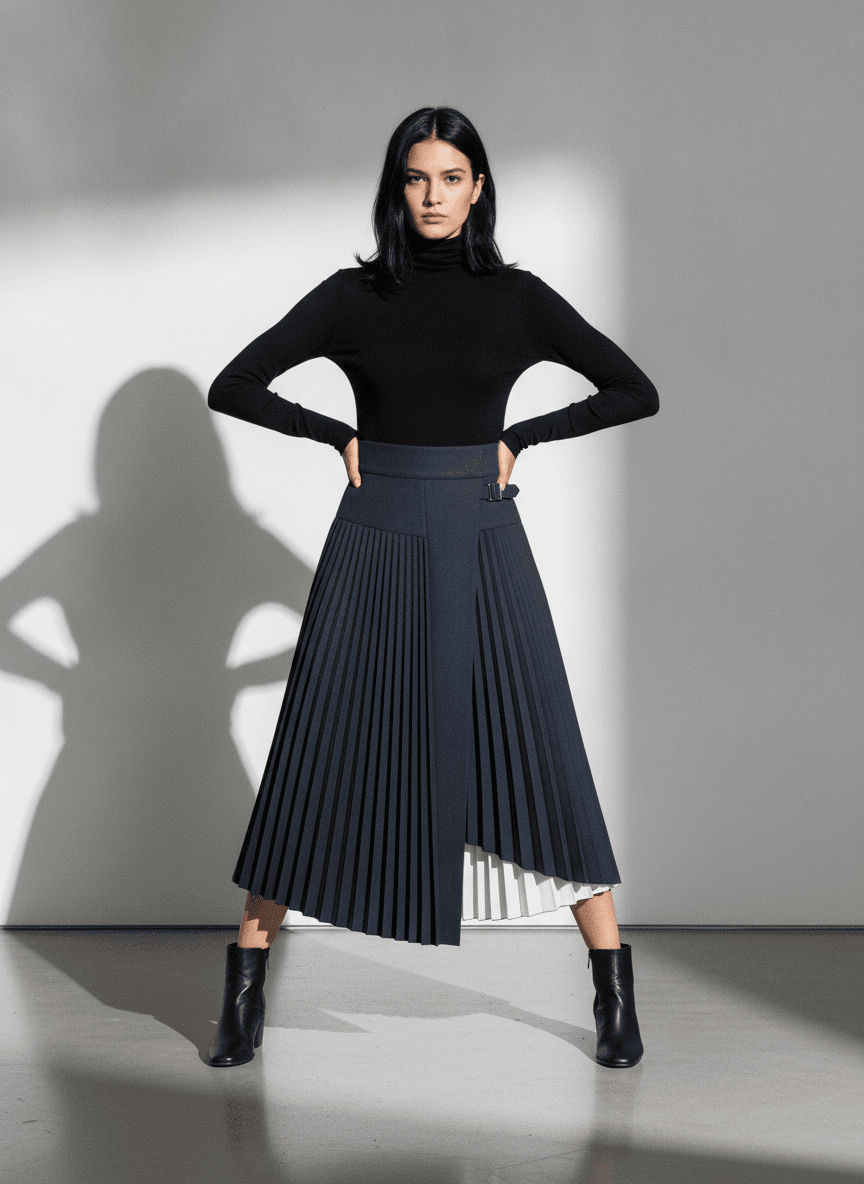
Photorealistic mockups help teams evaluate:
- Colour combinations
- Fabric appearance
- Artwork placement
- Range consistency
- Product presentation
- Early campaign or sales concepts
Traditional mockups are often built in Photoshop or rendered in 3D. AI visualisation is a faster route when you do not need pattern simulation: upload a sketch, flat CAD or product image and get a studio-style visual without building a complete 3D garment.
What AI mockups are good for
AI mockups are useful for:
- Early range reviews
- Buyer presentations
- Testing colourways
- Communicating a product vision
- Visualising artwork on a garment
- Reducing reliance on generic reference images
They should complement technical information, not replace it. Manufacturers still need accurate flats, measurements, materials, artwork dimensions and construction notes. The mockup shows the intended outcome; the tech pack explains how to produce it.
In clothink, you upload a sketch or artwork and get photoreal mockups back in seconds — no 3D skills required. See also AI fashion mockup generator.
CAD to mockup demo
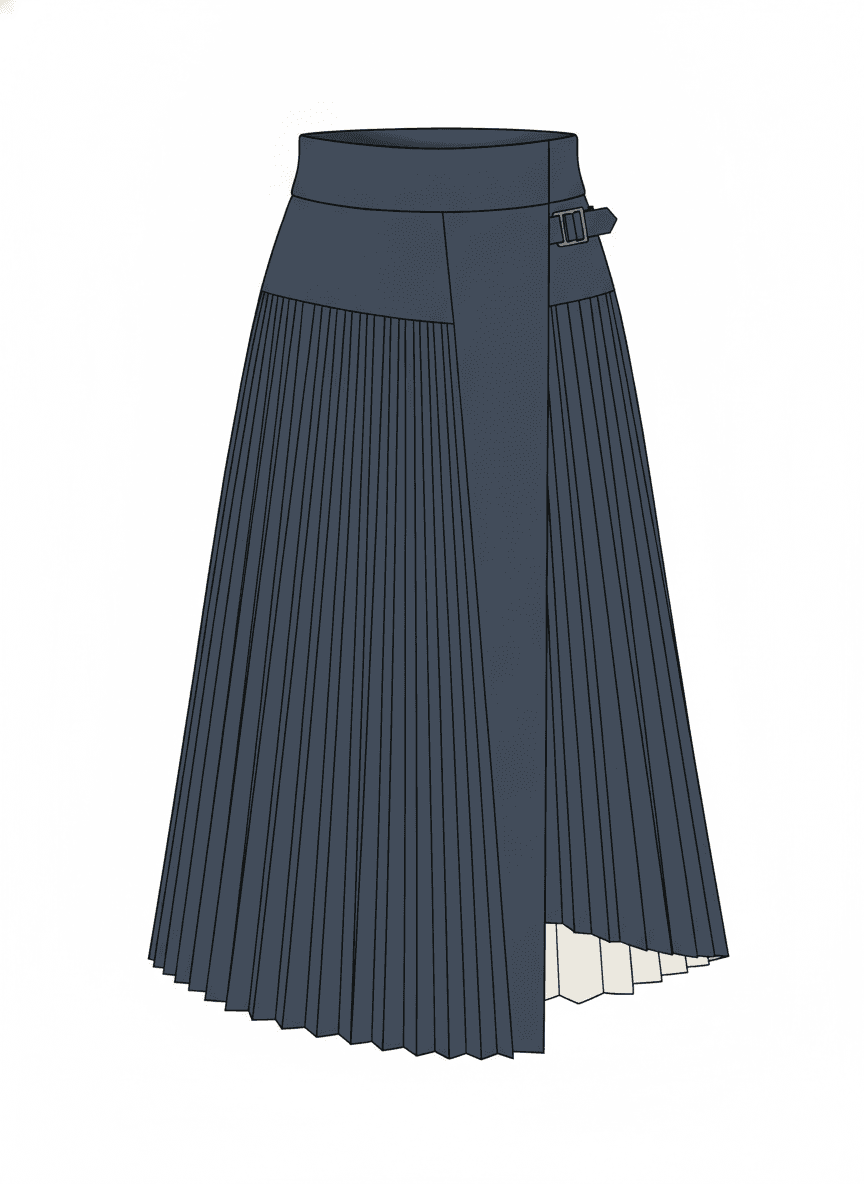
CAD flat
Awaiting render
Photoreal mockup
Always check an AI mockup against the approved design. AI may alter pocket shapes, seams, trims or proportions — keep the visual linked to the sketch or product specification you signed off.
6. Tech packs and factory communication
This is where many fashion software workflows break down. A product may look resolved creatively, but the factory still needs structured information to sample and manufacture it correctly.

A typical tech pack may include:
- Style information
- Technical flats
- Fabric specifications
- Colour references
- Size charts
- How-to-measure guidance
- Bill of materials
- Artwork placements
- Construction notes
- Label and packaging details
- Revision history
Spreadsheets and general design software
Spreadsheets are familiar and cheap, and they can work for a handful of simple products. Problems start when measurements live in one sheet, the BOM in another, CADs in a folder and comments in email — nobody knows which version is current.
Illustrator, InDesign and presentation tools can also produce attractive tech packs, but the data is often manually positioned rather than stored as structured product information.
Dedicated tech pack software
Tech pack software organises specifications, measurements, materials and factory-facing documents. The real benefit is not the PDF — it is a connected product record you can update without rebuilding the whole document. AI can draft descriptions, measurement points, BOM items or construction notes from garment context; those drafts still need technical review.
In clothink, mockups connect to styles and tech packs — size charts, BOM, construction notes and PDF export — with AI drafts built from what you already know about the garment.
Tech pack workspace
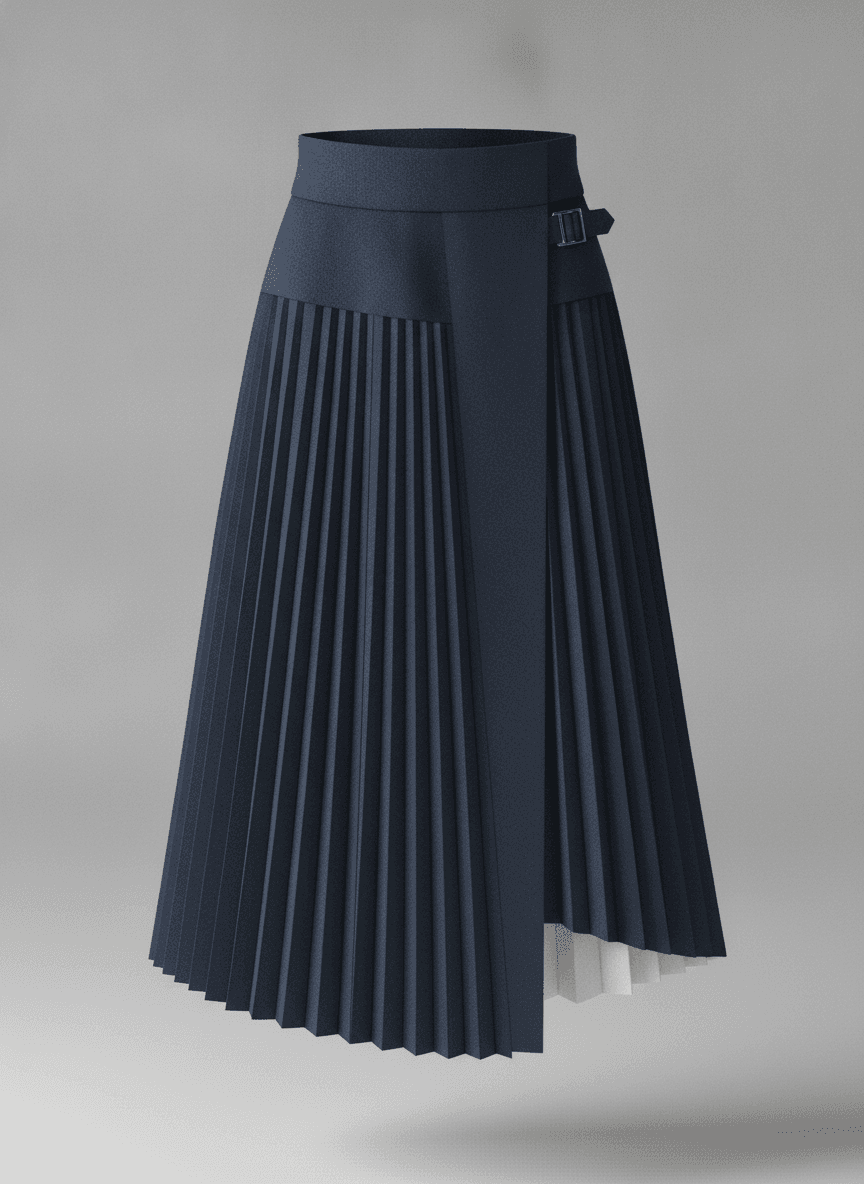
Approved mockup
Style Information
Style code
SKT-AW26-03
Style name
Pleated Midi Skirt
Product
Skirt
Season
AW26
Fit
Regular
Treat the exported PDF as a snapshot for the supplier, not the only source of truth. Keep the underlying product information editable — otherwise every revision creates another disconnected document.
7. Product lifecycle management software
PLM software manages product information, workflows, approvals and collaboration across a larger organisation — seasonal line planning, product records, materials and suppliers, costing, compliance, sampling status, critical paths, version control and links to other business systems.

PLM can become essential when many departments and suppliers share a large product range. It can also be unnecessarily heavy for a start-up on its first collection. Implementation usually means process mapping, data migration, training and configuration — and you risk formalising a process that is still changing.
When PLM makes sense
PLM becomes more appropriate when:
- Hundreds of styles are being managed
- Several departments require the same product data
- Supplier and approval workflows are complex
- Reporting and governance matter
- Product information must integrate with ERP or commercial systems
Do not buy PLM purely to tidy disorganised folders. First decide which information needs control, who owns it and how products move from concept to approval. Software cannot fix an undefined process by itself.
The best software stack for different teams
Independent fashion designer
A solo designer may only need:
- Pinterest or Milanote for references
- Illustrator or Affinity for flats and artwork
- A lightweight tech pack system
- AI visualisation for product mockups
Full PLM or industrial pattern software is unlikely to be necessary unless pattern development is handled in-house.
Start-up clothing brand
A start-up needs to turn ideas into clear supplier information without a complicated technology stack. Prioritise strong product concepts, accurate technical flats, clear mockups for internal approval, complete tech packs and controlled revisions. Specialist pattern and 3D work can stay outsourced until volume justifies bringing them inside.
Small apparel team
Once several people edit styles, separate spreadsheets and personal folders fall apart. Prioritise shared product information and version control — a shared apparel workspace reduces repeated data entry and keeps visuals, specifications and revisions connected.
Established brand or enterprise
Larger brands may need specialist software at every stage:
- Vector design
- Pattern CAD
- 3D development
- PLM
- ERP
- Digital asset management
- Supplier portals
At this level, integration between systems becomes as important as the individual tools.
Where clothink fits
Most of the categories above still matter. What clothink changes is the middle of the journey — turning a rough idea into a photoreal mockup and a factory-ready tech pack in one workspace, without rebuilding the style in Illustrator, a spreadsheet and a shared drive.
Upload a sketch or write a brief and generate coloured or flat sketches. Build colour palettes and placement artwork. Turn that work into photoreal mockups for founders, buyers and sales. Promote the style into a tech pack with size charts, BOM, construction notes and a supplier-ready PDF — white-labelled with your Brand when you need it.
In practice, that means you can:
- Explore directions and lock a silhouette before you commit to detailed vector work
- Show stakeholders a finished-looking garment without waiting on a sample or a 3D specialist
- Keep measurements, materials and construction notes attached to the same style as the visuals
- Export a PDF the factory can work from, then revise without starting another disconnected document
- Share the workspace with a pattern maker or teammate instead of emailing folders
clothink is not a replacement for every specialist tool. Illustrator is still the right place for precise final vector artwork. CLO or Browzwear matter when you need pattern-based fit and drape simulation. Industrial pattern CAD remains essential for grading and markers.
If you are a start-up, independent designer or small apparel team, those specialist systems are often overkill — or outsourced. The expensive part is usually the gaps: losing colour and construction detail between concept, mockup and tech pack. That is the problem clothink is built to solve.
See sketches and concepts, photoreal mockups and tech packs — or jump straight to pricing.
What to avoid when choosing fashion software
The most expensive system is not automatically the most suitable. Avoid a stack where several tools hold competing versions of the same product — decide which system owns the approved record and which tools do specialist work. Do not invest in complex 3D, pattern or PLM systems without the skills and processes to use them. And do not choose software on demo images alone: check what you can export, how revisions are controlled and whether suppliers can use the output.
Most importantly, do not treat sketch generation, mockups and technical development as unrelated activities. Every handoff is another chance for information to drift.
Final recommendation
The best fashion design software is not one application. It is a stack that matches how your products are developed. Use vector software when accuracy and editable linework matter. Use apparel CAD for patterns and grading. Invest in 3D when fit, drape and digital sampling justify the learning curve. Use PLM when product volume and organisational complexity require it.
For smaller fashion brands, the biggest win is usually connecting the stages you already manage — ideas, visuals, specifications and factory communication — so you move from concept to production with less duplication and fewer version errors.
Frequently asked questions
What software do professional fashion designers use?
Professional fashion designers commonly use Adobe Illustrator for technical flats and artwork. Depending on their role, they may also use CLO, Browzwear or Style3D for 3D garments, and Gerber AccuMark, Lectra, Optitex or TUKAtech for pattern development.
Is Adobe Illustrator enough for fashion design?
Illustrator is highly effective for technical flats, prints, graphics and presentation work. It does not natively manage measurements, BOMs, product revisions or factory workflows, so it is often combined with spreadsheets, tech pack software or PLM.
Do I need CLO to start a clothing brand?
Not necessarily. CLO is valuable when you need pattern-based 3D simulation, fit reviews or digital sampling. Many start-ups begin with technical flats, mockups, tech packs and external pattern-development support.
What is the difference between 3D fashion software and AI mockup software?
3D fashion software builds a digital garment from patterns and material properties. It can support fit, drape and construction decisions. AI mockup software creates a photoreal visual from a prompt, sketch or CAD and is better suited to rapid visualisation.
What software is used to make tech packs?
Tech packs can be created using spreadsheets, Illustrator, InDesign, specialist tech pack platforms or PLM systems. Dedicated apparel-development software is usually easier to manage because measurements, BOMs, construction notes and visuals remain structured and connected.
What is the best fashion design software for a start-up?
A start-up usually needs a simple combination of concept development, technical flats, product mockups and tech packs. Complex pattern CAD or PLM may not be necessary unless those processes are being managed internally.
Can AI fashion software replace a technical designer?
AI can accelerate sketch generation, visualisation and the first draft of technical information. It cannot reliably replace the judgement required to check fit, construction, measurements, materials and manufacturability.
One workspace from concept to production
Generate coloured and flat sketches, photoreal mockups and supplier-ready tech packs in clothink — without losing context between stages.
See clothink pricing for plans from independent designers to team workspaces.