Fashion techclothink
CLO 3D Alternatives for Fashion Brands: 2026 Comparison
- Software
- Product development
CLO 3D is a powerful tool for creating patterns, simulating fabric and checking garment fit. But not every fashion brand needs that level of 3D development.
If you want a direct alternative, Browzwear, Style3D, Optitex and TUKA3D are worth comparing. If you want something cheaper or easier to start with, look at Tailornova or Marvelous Designer.
If your factory handles pattern making and you mainly need to communicate your designs, you may not need 3D software at all. Here's how the alternatives compare, what they cost and which workflow each suits.
Disclosure: clothink publishes this guide and is not a 3D tool. Vendor details were read on their own websites on 15 October 2026, and CLO, Browzwear, Tailornova, Marvelous Designer and Style3D's terms were checked again on 21 October 2026. We didn't test every product hands-on. Where a 3D tool is the better answer, we say so.
Updated 21 October 2026.
Which type of software do you need?
- You need to check fit and drape. Look at CLO, Browzwear, Style3D, Optitex or TUKA3D. Browzwear is the closest like-for-like alternative, with published self-serve prices.
- You need patterns but you're not an experienced pattern maker. Look at Tailornova, which starts from design templates. Its 3D preview and grading need the $49 Commercial plan.
- You want digital clothing for games, film or content. Look at Marvelous Designer.
- You want to spend nothing. Style3D Studio has a free version, but only for personal learning and non-commercial use. Blender is free for 3D visuals but isn't a pattern-and-fit tool. The pattern-based tools have time-limited trials, and Browzwear has a Learner licence for students and recent graduates that needs a payment card.
- You mainly want realistic pictures of a design before you sample. A photoreal mockup can do that, whether it comes from a 3D tool or from clothink, which makes them from a drawing or a description with no patterns or 3D skills.
- You need to tell a factory what to make, not simulate fit. You may not need 3D at all. A photoreal mockup plus a reviewed tech pack, from clothink or from your own flats and a template, can be enough to get a first sample.
The alternatives at a glance
| Tool | Best suited to | Starting price |
|---|---|---|
| CLO 3D (for reference) | Fit, grading and digital samples | $50/month for individuals; companies via Enterprise (custom) |
| Browzwear VStitcher | Professional 3D garment development | $75/month |
| Style3D Studio | Companies linking 3D to development | Free for non-commercial use; commercial price not published |
| Optitex | Pattern CAD and manufacturing | Contact sales |
| TUKA3D | Fit reviews and fit in motion | 30-day free trial; no price published |
| Tailornova | Beginners wanting patterns | $29/month for personal use; 3D preview and grading from $49/month |
| Marvelous Designer | Digital clothing and CGI | $23.30/month, billed yearly |
| Blender | Free 3D visualisation | Free |
| clothink (not a 3D tool) | Photoreal mockups and a tech pack, without patterns or 3D skills | Free plan; £15 to unlock one pack's exports; plans from £19/month |
What each tool produces
Starting prices don't show what you get, so this compares the outputs. Illustrator and clothink aren't 3D tools. They're here because they cover the drawing, the look and the specification, which is often what a small brand actually lacks.
| Tool | 3D fit simulation | Realistic visuals | Production patterns | Tech packs |
|---|---|---|---|---|
| CLO 3D (for reference) | Yes | Yes, true-to-life 3D views | Yes (2D patterns, DXF) | Yes, generated in CLO-SET |
| Browzwear VStitcher | Yes | Yes, true-to-life 3D views | Yes | Freelancer Plus and Teams |
| Style3D Studio | Yes | Yes, renders and animations | Yes | Not stated on its home page |
| Optitex | Yes | Yes, photorealistic 360° images | Yes, with grading and markers | Yes |
| TUKA3D | Yes, including fit in motion | Yes, built-in rendering | Yes | Not stated on its page |
| Tailornova | 3D preview on the Commercial plan | 3D preview only | Made-to-measure; DXF on Commercial | Yes, on Commercial Pro ($79/month) |
| Marvelous Designer | Yes | Not stated on its home page | Not its focus | No |
| Blender | No; general 3D cloth tools | Yes, general 3D rendering | No | No |
| Adobe Illustrator | No | No | No | Only with a template you build |
| clothink | No | Yes, AI photoreal mockups | No | Yes, AI-drafted; you review it |
What CLO 3D does, and what it asks of you
CLO's product page sums up its value: “Open your DXF pattern, edit on flat, watch the 3D update the same second.” Fabric drape, stretch and weight are tuned to real fabric behaviour, grading can be checked across sizes, and teams can assess fit on screen before physical sampling, as long as the pattern, fabric data and avatar are accurate. Tech packs are generated from the 3D garment in CLO-SET, CLO's online platform.
Price and licences. CLO's plans page lists Individual at $50 a month “for individuals and independent professionals” and Student at $25 a month, both excluding tax. CLO's support pages say the Individual plan covers freelancers and one-person businesses, including sole proprietors, and that a company with more than one employee needs a business licence. Enterprise is custom-priced “for any company”, and the plans page gives as a typical case “a fashion company, regardless of size, that has at least one designer currently using CLO”. So a one-person brand can look at Individual, while a team should expect to talk to sales. CLO's own pages word the exact threshold slightly differently, so confirm yours with CLO before you buy. The trial page offers the first 14 days free, then $50 a month or $450 a year; a card is needed to start.
Skills and hardware. CLO is a desktop app built around 2D patterns. It lets you import patterns or draft them from scratch, and its own tutorials cover making a basic block, drafting a bodice and sleeve, and taking a pattern to production. But reliable fit simulation still needs an accurate pattern, appropriate fabric properties and a suitable avatar. Without the skills to develop and judge those inputs, a convincing 3D render shouldn't be treated as proof of fit. Budget time for training, and check its system requirements against your computer.
Pattern-based 3D alternatives
Browzwear VStitcher
Browzwear is the closest like-for-like alternative. Its VStitcher page describes “accurate virtual twins of physical garments”: 2D drafting and 3D draping together, avatars, grading, tension and pressure maps, virtual samples, pattern export and tech packs. On the pricing page, Freelancer is $75 a month or $750 a year for one user, Freelancer Plus is $150 a month or $1,500 a year and adds tech packs, and Teams is listed at $3,950 a year for up to three named users. Browzwear's launch announcement words that price as “$3,950 per user per year”, so confirm the total with Browzwear before you buy. Its Freelancer FAQ says these licences have no free trial or demo. Lotta, for styling from ready-made blocks rather than drafting, is listed only on the custom Enterprise plan.
CLO 3D vs Browzwear: both are serious pattern-based tools. CLO's Individual plan costs less for one person; Browzwear publishes a team price instead of sending every company to sales. In practice many brands choose whatever their pattern maker or suppliers already use, because sharing files is easier.
Style3D Studio
Style3D describes Studio as “AI-driven 3D simulation” that “connects design to production, reducing sampling and automating patterns and trims”. Its terms of service describe a Free Version that is “only for your personal learning and use”, with commercial use prohibited, so it isn't an option for a working brand. We found no published price for commercial licences. Its price page carried only a notice, in Chinese, that new perpetual-licence orders stopped on 30 April 2026, so ask for a quote, and confirm which features each tier includes. Style3D also lists automated pattern creation. Whichever tool drafts a pattern, the pattern and the virtual fit still need technical validation.
Optitex
Optitex's 2D and 3D CAD software combines pattern making, grading and marker making with 3D virtual samples, a tension map and tech packs; changes to the 3D sample update the 2D pattern. It suits teams that already work in pattern CAD. No price is published; you contact sales.
TUKA3D
TUKAtech's TUKA3D builds garments from real pattern data on avatars made from body scans, shows stretch, pressure and tension, and animates the avatar so “fit is analyzed in motion”. It includes TUKAdesign for pattern making and grading. The page offers a 30-day free trial but no TUKA3D price.
Cheaper and beginner-friendly options
Tailornova
Tailornova is aimed at indie designers, students and home sewers. You start from design templates, and it produces made-to-measure patterns and a 3D preview on a FitModel built from measurements. Read the price page carefully, because what's included changes between plans. Personal is $29 a month, for personal use only, without 3D preview or grading. Commercial, at $49 a month, adds 3D preview, grading, a commercial and reseller licence and DXF pattern downloads. Commercial Pro, at $79 a month, adds Tailornova's AI pattern design software and lists “Unlimited Tech Packs with all size runs”; we haven't tested how complete those packs are. It is the most approachable route to real patterns here, though not a full fit-simulation suite.
Marvelous Designer
Marvelous Designer comes from the company behind CLO and calls itself “garment design and fabric simulation software built for professional pipelines”. Its home page lists games, VFX, animation and motion graphics. The pricing page lists Individual at $23.30 a month billed yearly, with a two-week trial. That's the yearly price spread over twelve months, and the page shows a saving of $188 over paying monthly, so month-to-month costs more. It costs less than CLO and simulates cloth well, but it is built for digital garments rather than production patterns and fit approval.
Is there a free CLO 3D alternative?
For commercial work, not really. Blender is “Free and Open Source software, forever” and can be used commercially, and its cloth tools can make convincing clothing visuals. It isn't built around sewing patterns, grading or fit, so it doesn't replace CLO for production.
The free routes to pattern-based 3D are all limited: Style3D Studio's free version (personal learning and non-commercial use only), CLO's 14-day trial, TUKA3D's 30-day trial, Marvelous Designer's two-week trial, or Browzwear's free six-month Learner licence for students and recent graduates (non-commercial, with approval). Check the small print on that last one. Browzwear's help centre says a payment method is required for verification, and that the Learner licence converts to a paid Freelancer subscription if you don't cancel before it ends.
3D simulation, mockups and tech packs: what each does
A 3D garment, a photoreal mockup and a tech pack can look like competing answers. They answer different questions, and a photoreal mockup is the one most easily mistaken for a 3D render.
- A pattern-based 3D simulation tests how a garment would fit and drape: whether the panels pull at the waist, how a peplum hangs, how each size grades. It's made in a tool like CLO or Browzwear, and it's only as accurate as the pattern, fabric data and avatar behind it.
- A photoreal mockup shows the intended look: the fabric, topstitching, panels and trims. It's for agreeing the design with partners and buyers. It doesn't prove fit.
- A tech pack tells the factory what to make: materials and trims, measurements with how to take them, construction notes and call outs on the flat. It leaves fewer decisions open to interpretation.
3D render or photoreal mockup?
Both give you a realistic picture of a garment that doesn't exist yet. What stands behind the picture is different.
| What to compare | Render from a 3D tool | clothink photoreal mockup |
|---|---|---|
| Made from | A 3D garment built from a pattern, fabric data and an avatar | Your drawing, sketch or written description |
| Fit and drape | Can show how the garment sits and drapes, if the pattern, fabric data and avatar are accurate | Not simulated. It shows the intended look, not proof of fit |
| Skills you need | Pattern and 3D skills | None. Upload a drawing or describe the garment |
| Changing a detail | Change the pattern or fabric, then render again | Describe the change, or use Precise edit on one part |
| What you get | Renders, plus a 3D garment you can turn, grade and take patterns from | Product shots, on-model images, close-ups and short video, linked to a tech pack |
| Best for | Checking fit, grading and selling from digital samples | Agreeing the look and briefing a factory |
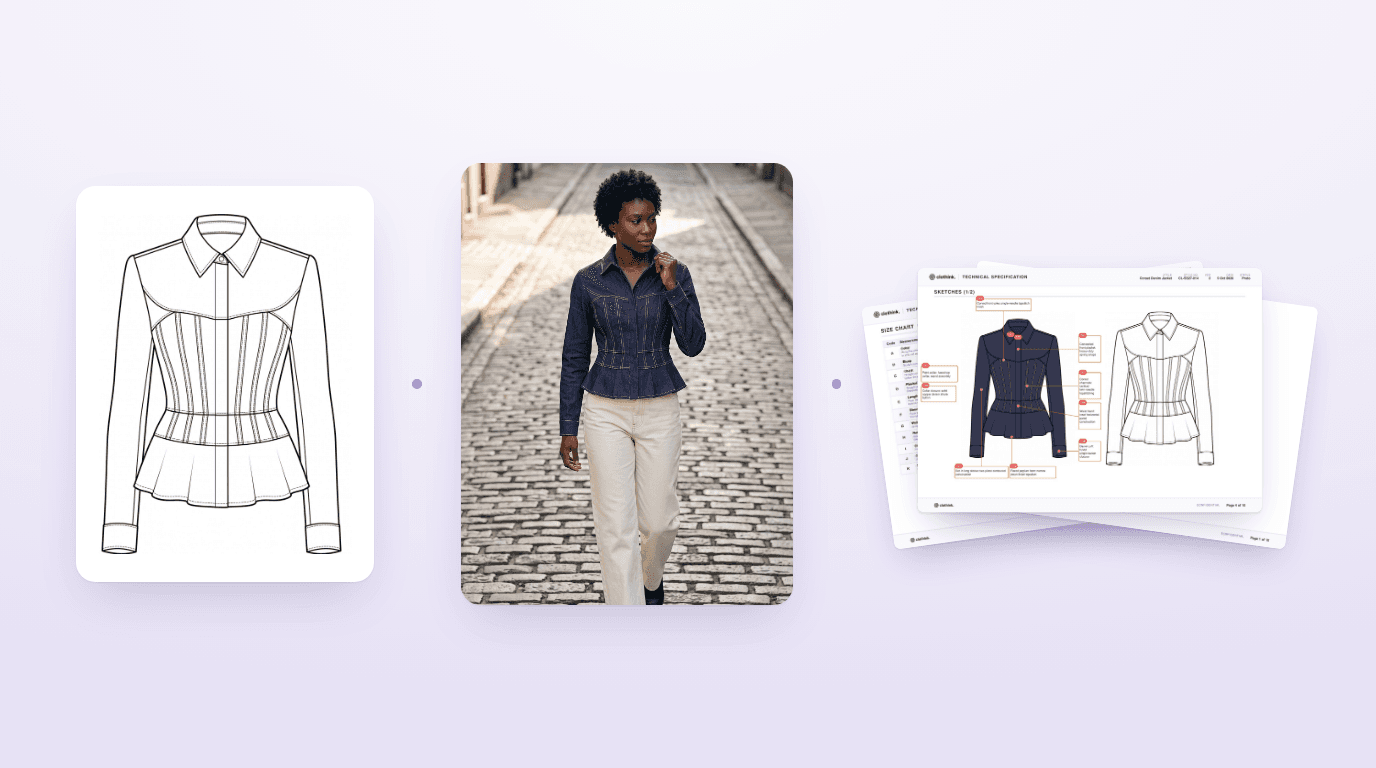
The pictures below show the last two for one jacket, both made in clothink: its technical flat and photoreal mockup, and a page from its tech pack. We don't show a 3D simulation of it because we didn't make one. That would be a job for CLO or Browzwear, working from a pattern.


For a reliable quote and first sample, a factory needs more than a picture. Clear drawings, materials, measurements and construction details give its team something to work from, and a reviewed tech pack brings those instructions together. Many factories work from exactly that, with their own pattern maker handling the pattern and the fit sample. To see a finished pack, read our tech pack example. For what goes wrong when the spec is thin, see why clothing samples come back wrong, how to build a size chart for production and how to write a tech pack factories will quote from.
So a 3D tool may be worth it when someone on your team drafts patterns and will use it every week, when you sell from digital samples, or when you grade across many sizes. If your factory or a freelance pattern cutter makes the patterns and your problem is explaining the design, a mockup and a clear tech pack may be all you need to start.
Where clothink fits, and where it does not
clothink is not a cheaper CLO. It solves a different problem: getting a design agreed and specified when you don't make patterns. You describe a garment, upload a sketch or start from a reference, and refine photoreal mockups with Precise edit. Auto-Complete then drafts the tech pack: materials and colours, bill of materials, a size chart graded across your size scale, construction notes, a How to Measure guide and numbered call outs on your sketch. Review the measurements, materials and construction details, then export a PDF or Excel tech pack to share with your factory for quotation or sampling.
Its photoreal mockups do some of the visual job of a 3D render, such as showing a garment in a fabric before it exists, without needing patterns or 3D skills. Be clear about the limits. You can add a photo of your fabric and the mockup renders the garment in that cloth, which shows its colour, texture and sheen. It can't tell you the fabric's weight, stretch, handle or how it really drapes. The AI-drafted measurements and construction are a starting point, not something a picture can settle, so you or your pattern maker check them. clothink doesn't make sewing patterns or 3D garment files and doesn't simulate fit, so you still need a pattern maker and a physical fit sample. Its six-second 360° turn of a mockup is a video, not a 3D model.
Some teams use both: 3D for core blocks, clothink for quick visuals and drafted specs. clothink starts on a Free plan with no card, 10 starter tokens that never expire and up to 3 active tech packs. Unlocking one pack's PDF, Excel and logo costs £15, and paid plans start at £19 a month. For how this compares with other spec tools, see our guide to tech pack software for fashion brands, and for the whole software landscape, the guide to fashion and apparel design software.
Frequently asked questions
Is there a free alternative to CLO 3D?
For commercial work, not really. Style3D Studio has a free version, but only for personal learning and non-commercial use. Blender is free and open source and can make 3D clothing visuals, but it isn't built around sewing patterns, grading or fit. For pattern-based 3D you can use free trials (CLO 14 days, TUKA3D 30 days, Marvelous Designer two weeks) or, if you're a student or recent graduate, Browzwear's free six-month Learner licence for non-commercial use. Browzwear says that licence needs a payment method and converts to a paid subscription if you don't cancel before it ends.
Which CLO 3D alternative is easiest for beginners?
Tailornova is the most approachable: you start from design templates and it produces made-to-measure patterns, with a 3D preview and grading on its $49 a month Commercial plan and tech packs on its $79 a month Commercial Pro plan. The professional tools (CLO, Browzwear, Style3D, Optitex, TUKA3D) all assume pattern knowledge for accurate fit.
Can you use CLO 3D without pattern-making experience?
You can learn the software, and CLO lets you draft patterns from scratch, so you don't have to arrive with pattern files. But fit in CLO comes from the pattern, the fabric data and the avatar, and judging them takes pattern-making knowledge. Without it, a render is a convincing picture, not a reliable fit check.
CLO 3D vs Browzwear: which is better for a small brand?
Both are strong pattern-based tools. On prices checked in October 2026, CLO's Individual plan is $50 a month for individuals and one-person businesses, with larger companies pointed to custom Enterprise pricing, while Browzwear's Freelancer plan is $75 a month and its Teams plan is listed at $3,950 a year for up to three named users (confirm whether that is per user). Many brands pick the one their pattern maker or suppliers already use.
Can AI replace CLO 3D for fashion design?
Not for fit. AI image tools, including clothink, make convincing pictures of a garment, but they aren't built from your pattern, so they can't show that a sleeve pulls or a waistband gapes. They're useful for agreeing the look and drafting a specification, which is a different job.
Do I need 3D software to create a clothing tech pack?
No. A tech pack needs clear flats, materials and trims, measurements with points of measure, and construction notes. You can build one in Illustrator and a spreadsheet, in tech pack software, or draft it with AI in a tool like clothink and then review it. Some 3D tools, such as CLO via CLO-SET, Browzwear on its higher plans and Tailornova on Commercial Pro, can also produce tech packs.
Can a manufacturer make a sample without a 3D model?
Yes. Many factories quote and sample from a tech pack: their pattern maker drafts the pattern, and fit is settled at the fit sample. Some factories work in 3D and can use a 3D file, so ask yours before you buy software for it.
Sources
Checked on 15 October 2026, with CLO, Browzwear, Tailornova, Marvelous Designer and Style3D's terms checked again on 21 October 2026: CLO plans, trial, product page, licence FAQ, pattern FAQ and CLO-SET tech pack article; Browzwear pricing plans, pricing announcement, VStitcher, Lotta and Freelancer FAQ; Style3D home page, price notice and terms of service; Optitex 2D and 3D CAD software; TUKAtech TUKA3D; Tailornova home page and pricing; Marvelous Designer home page and pricing; Blender; Adobe Illustrator UK plans. clothink details come from our product and pricing pages.
Don't need to simulate fit? You may not need 3D software
If your factory makes the patterns, start with the look and the spec. Make a photoreal mockup and draft the tech pack you will review and send, on the Free plan with no card.